
4.28Genset manager
The gateway service that reads a MEBAY DC6xD generator controller over RS485 and sends it start, stop, test, manual, auto and mute commands.
The Genset Manager is the service behind the Genset Panel and the buttons of the Generator Panel. It names the MEBAY DC6xD MK2 controller you added as a Modbus RTU device, and the gateway then reads its status and sends it commands.
#What it does
- Reads the controller's electrical values, mode, running status, alarm and fuel level once per poll cycle.
- Sends Start, Stop, Test, Manual, Auto and Mute to the controller, then reads it back so the apps show the real state.
- Controls one generator per project.
#Before you enable it
- Open Server > Interfaces > RS485 Interface, turn Enabled on and set the serial parameters of the controller (see RS485 interface).
- Under Configure RTU Devices add a device with the driver MEBAY - MEBAY DC6xD MK2 Generator Controller and the controller's Slave ID. Leave the device's own Enabled switch on. See Modbus devices and datapoints.
The driver has no datapoints of its own. The Genset Manager reads a fixed MEBAY register map, so nothing needs to be mapped by hand. The list in the manager shows RS485 devices only.
#Settings
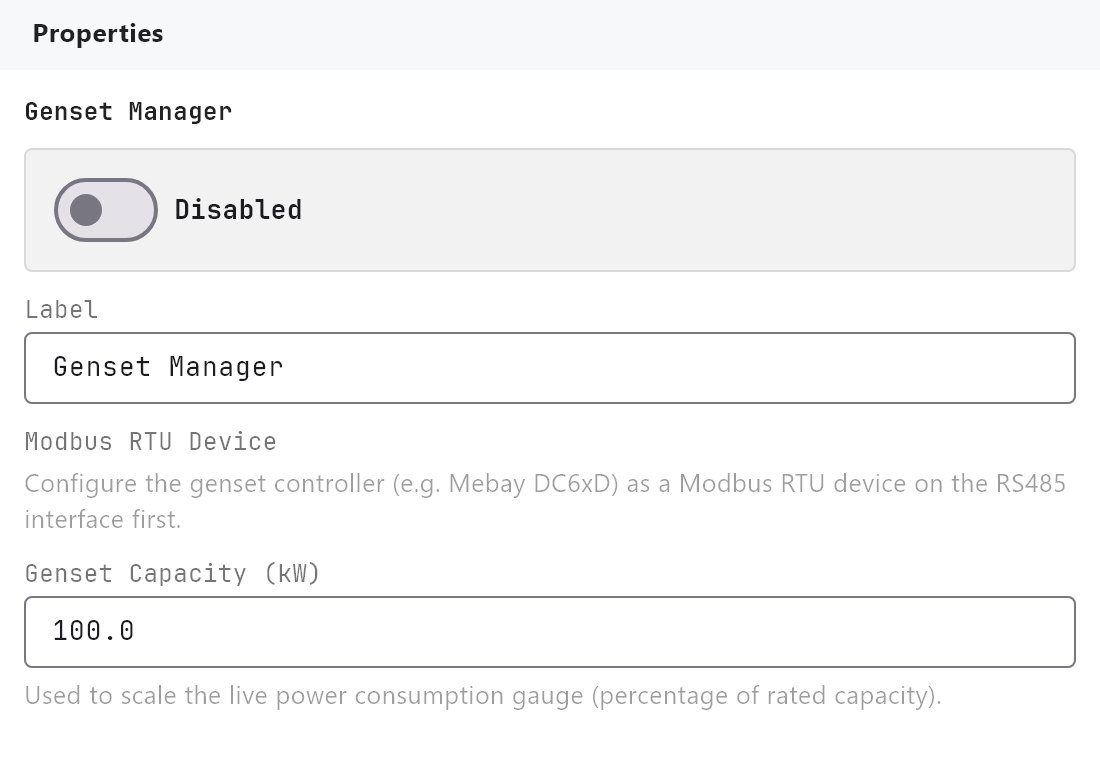
Open Server > Internal services > Genset Manager. Enabled is Off by default.
| Setting | What it does |
|---|---|
| Label | Name of the service in the Configurator. Default Genset Manager. It is also the prefix of the value names offered to other objects. |
| Modbus RTU Device | The controller, listed as name (slave N). Nothing is polled and no command works until one is chosen. |
| Genset Capacity (kW) | 1 to 5000, default 100. The rated power of the generator. The apps use it as the full scale of the Power Consumption gauge. |
#How it works on the gateway
- Polling: one read of 89 registers (addresses 1000h to 1058h, function 03) per cycle, shared with the other Modbus devices on the port. The cycle time is 2 seconds by default and cannot be changed in the Configurator.
- Values read: engine speed, battery voltage, charging voltage, frequency, voltage L1/L2/L3, current L1/L2/L3 and total, active power (per phase and total), fuel level, mode, running status and alarm.
- Mode is the controller's switch position: Stop, Manual, Auto or Test. Status is the controller's running status, for example
Waiting,Rated runningorCooling running. Alarm isNoneor the controller's alarm text (for exampleLow oil pressure sensor,Over speed,Emergency stop). - Commands: each button writes a command code to the controller's keyboard block at 2000h (function 10h, two registers: password and command). The password is the controller's default one, fixed in the gateway software; there is no setting for it. After a command the gateway re-reads the controller.
- Values for other objects: the decoded values are also published as system values named
genset:.... The Configurator offers them under the group Genset Manager in the Analog Value System Value list and in the Generator Panel mapping, once a Modbus RTU Device is chosen. - The gateway can also send generator-breaker and mains-breaker commands. No panel or setting uses them.
#Example
A 150 kW standby generator:
- RS485 Interface: Enabled on, device
Generator, driverMEBAY - MEBAY DC6xD MK2 Generator Controller, Slave ID1. - Genset Manager: Enabled on, Modbus RTU Device
Generator (slave 1), Genset Capacity (kW)150. - Add a Genset Panel (or a Generator Panel and click Auto-map to Genset Manager) on a page and deploy.
#Tips and common problems
- Every reading shows
--: RS485 is not enabled, the Slave ID, baud rate or parity do not match the controller, or no Modbus RTU Device is chosen. - A button says "No Modbus RTU device configured for the genset controller.": the manager has no device selected.
- The gauge is nearly empty at full load: Genset Capacity is set too high.
- Values from a controller other than MEBAY: the manager cannot read it. Add its datapoints as ordinary Modbus datapoints and map them in the Generator Panel. The buttons still need a MEBAY controller.
#See also
Still stuck? Open a ticket from the support portal and mention the page you followed.