
4.11KNX engine
Reference for every KNX engine setting, the gateway's KNXnet/IP bridge for ETS, the Configurator test connection, and the group address list.
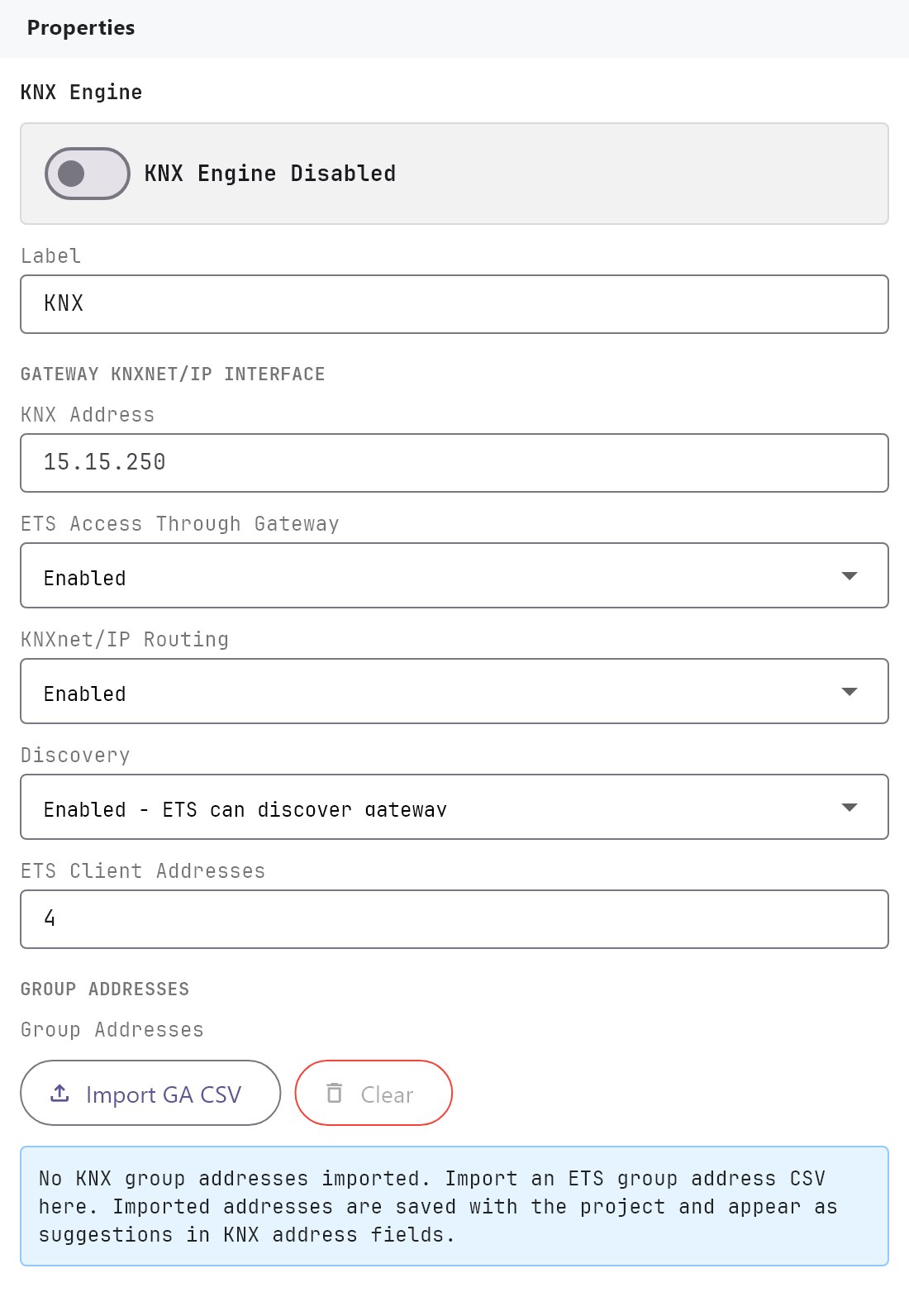
The KNX engine connects the gateway to the KNX bus and holds the settings that the dashboard objects, the Configurator and ETS rely on. This page lists every setting. For a step-by-step walkthrough, see KNX basics for installers. You find the engine under Server > Engines > KNX.
#What it does
- Sets the gateway's own KNX address and how ETS can reach the bus through the gateway.
- Holds the Configurator's own test connection, used by Run Test.
- Stores your imported group address list, which every group address field in the project can use.
#Before you enable it
- Pick a free individual address for the gateway, and make sure the next few addresses on the same line are free for ETS (see ETS client addresses).
- Export your group addresses from ETS as CSV, if you want autocomplete.
- For the Configurator test connection, your PC must be on the same network as a KNX/IP interface or router.
#Settings
The top of the page has Enabled (off by default) and Label (default KNX).
#Gateway KNXnet/IP Interface
| Setting | What it does |
|---|---|
| KNX address | The gateway's individual address, written area.line.device, for example 1.1.250. Area and line are 0 to 15, device 0 to 255. If the value is empty or invalid, the gateway uses 1.1.250. The grey 1.1.250 in the field is only a placeholder. This is the same setting as KNX Individual Address under Server > Gateway. |
| ETS access through gateway | Enabled (default) or Disabled. When enabled, ETS can connect to the bus through the gateway. The three settings below appear only when it is enabled. |
| KNXnet/IP routing | Enabled (default) or Disabled. Lets the gateway route telegrams over IP multicast. |
| Discovery | Enabled - ETS can discover gateway (default) or Disabled. ETS lists the gateway under the name veltnova when it searches. |
| ETS client addresses | How many tunnel addresses the gateway offers ETS. 1 to 32, default 4. |
The client addresses start right after the gateway's own address. With a gateway at 1.1.250 and the default of 4, they are 1.1.251 to 1.1.254. If the gateway's device number is above 250, the range counts down from just below it instead. Make sure these addresses are not used by real devices.
#Configurator Test Connection
These settings are for your PC, not the gateway. Run Test uses them.
| Setting | What it does |
|---|---|
| Selected Interface | Read only summary, for example 224.0.23.12:3671 - 15.15.15 - Routing. |
| Connection Mode | Tunneling - direct KNX/IP interface or Routing - multicast 224.0.23.12 (default). Choosing Routing sets the address to 224.0.23.12. |
| KNX/IP Address | The interface's IP address for tunnelling. Default 224.0.23.12. |
| Port | Default 3671. |
| Configurator Physical Address | The individual address your PC uses on the bus. Default 15.15.15. It must not clash with a real device. |
| Network Search | Search Interfaces scans the network. Each result shows interface name, address and port, and medium. Click Select to fill in the address and port and switch to tunnelling. |
Search Interfaces works only in the desktop Configurator. It reports Found n KNX/IP interfaces or No KNX/IP interfaces found on this network. Changing any of these fields drops the current test connection, so start the monitor again.
#Group Addresses
| Control | What it does |
|---|---|
| Import GA CSV | Opens a .csv or .txt file. The imported list replaces any earlier list. |
| Clear | Removes the whole list. Disabled when the list is empty. |
The list is saved with the project, and appears as autocomplete in every KNX address field. Until you import one, the page says No KNX group addresses imported. After an import it shows the count.
The import accepts three-level addresses only (main/middle/sub, for example 1/2/10). The separator (semicolon, comma or tab) is detected for you. A header row is recognised when it contains a column such as address, name, description or DPT. A file with no header row also works. Duplicate addresses are merged and the list is sorted. A row without a data type is listed with the type Unknown. The Configurator reads the CSV export only, not .knxproj files.
#How it works on the gateway
- The gateway reaches the KNX bus through its onboard KNX interface and the
knxdservice. When you deploy, the gateway writes your gateway address, client address range, discovery and routing choices into theknxdsettings and restarts it only if something changed. - A restart briefly interrupts the bus connection. If Enabled has been switched off, the gateway leaves its KNX settings alone.
- The gateway's own tools connect to
knxdon the gateway itself (127.0.0.1). Dashboards, schedules, the Zigbee bridge and the MQTT client all go through this connection. - After a deploy and after every reconnect, the gateway reads each group address that canvas objects use, one at a time, so objects start with real values. Addresses used only in MQTT bindings or Zigbee settings are not read.
- The gateway remembers the latest value of each group address that it has seen, and keeps the newest 200 telegrams in memory.
#Telegram monitor
- In the Configurator. The telegram monitor in Diagnostics > KNX Telegrams listens from your PC on the KNX routing address and lists the telegrams it sees. See Diagnostics.
- On the gateway. The gateway console Monitor tab shows live Bus Messages and a Send Telegram form. This tests the path the apps use. See Gateway console and logs.
#Example
A gateway on line 1.1 with room for ETS.
| Setting | Value |
|---|---|
| KNX address | 1.1.250 |
| ETS access through gateway | Enabled |
| KNXnet/IP routing | Enabled |
| Discovery | Enabled - ETS can discover gateway |
| ETS client addresses | 4 |
ETS now finds veltnova and can open up to four tunnel connections, using 1.1.251 to 1.1.254. For the Configurator, choose Connection Mode Tunneling, click Search Interfaces and Select your interface, and leave Configurator Physical Address at 15.15.15.
#Tips and common problems
- ETS does not list the gateway. Check that ETS access through gateway and Discovery are enabled, the project is deployed, and your PC is on the same network.
- Objects stay at an unknown state. The status address must answer read requests, or send a telegram when it changes.
- Test connection fails. Check the mode, address and port. The test gives up after 5 seconds with KNX connection timed out.