
4.13Solar events
Runs KNX actions at dawn, sunrise, solar noon, sunset and dusk, with an optional delay, and shows today's sun times.
Solar events let the gateway switch things at the same moment every day relative to the sun, for example garden lights at sunset. You find them under Server > Engines > Solar Engine > Solar Events.
#What it does
- Calculates dawn, sunrise, solar noon, sunset and dusk for the location set on the Solar engine.
- At each event time, plus or minus an optional delay, writes one or more values to KNX group addresses.
- Optionally also writes the event time itself to a KNX address, for a display or clock on the bus.
#Before you enable it
- Enable the Solar engine and set a location there.
- The KNX engine must be running, because every action is a KNX write.
- Know the group addresses you will write to.
#Settings
| Setting | What it does |
|---|---|
| Enabled | Off by default. Actions run only when this and Solar Engine are both on. |
| Events | The solar events and their actions, described below. |
#Events
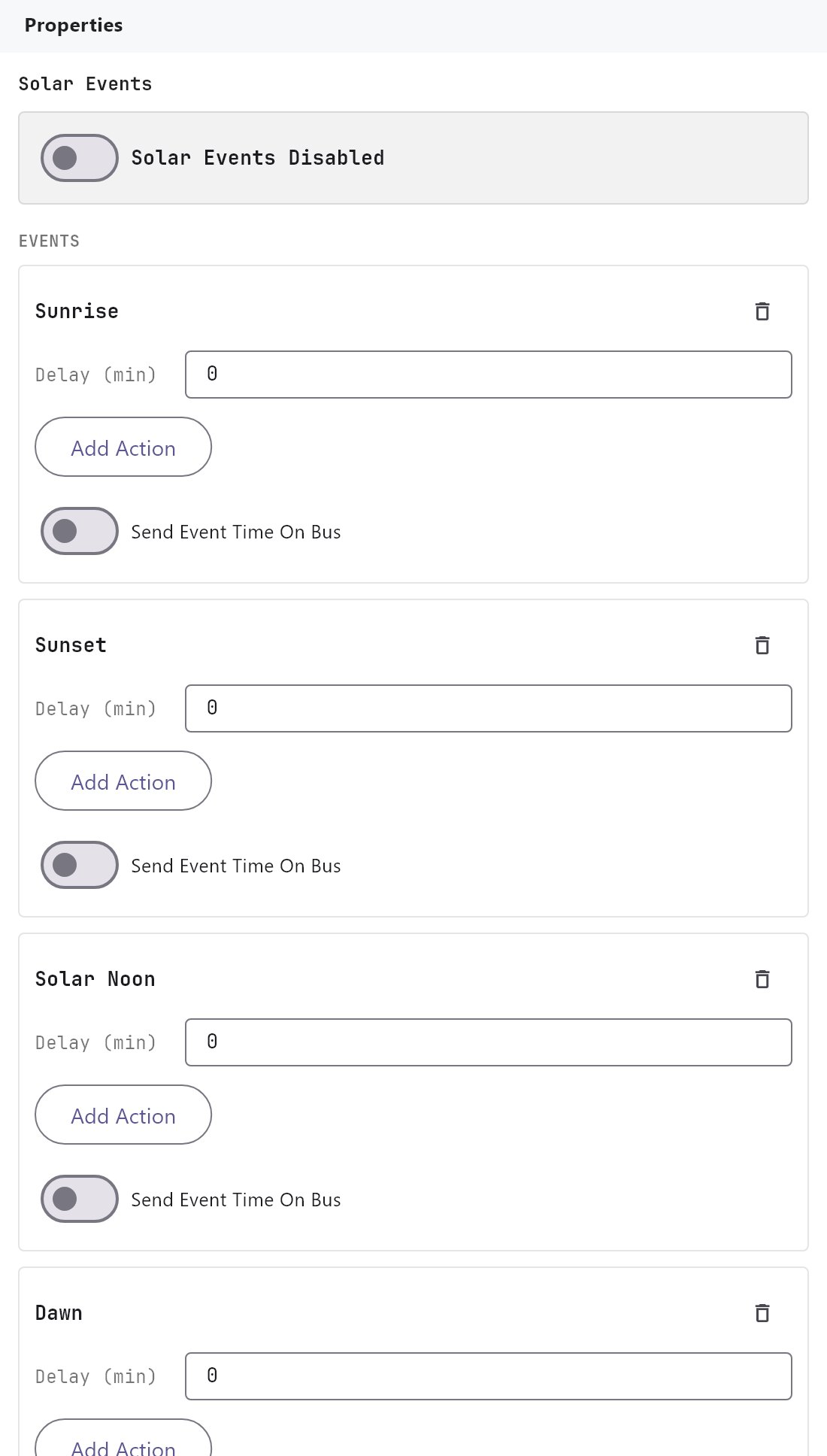
The Events list holds the events that run actions. A new project starts with Sunrise, Sunset, Solar Noon, Dawn and Dusk, with no actions. Add Event opens a menu of the solar events that are not in the list yet; each event is in the list once. The trash icon on a card removes the event. Edits apply as you type.
Each event is a card with:
| Field | What it does |
|---|---|
| Delay (min) | Shifts the time of the event. -720 to 720, default 0. A negative number runs the action before the event. |
| Actions | The KNX writes the event runs. They are edited in the Actions editor, described below. The card shows how many it has. |
| Send Event Time On Bus | Off by default. When on, the event's own time is also written to Event Time Group Address, in the data type chosen below it: DPT 10 - Time, DPT 11 - Date, DPT 19 - Date + Time or DPT 16 - String. This is independent of the action. |
An action with an empty group address does nothing. Actions are write only: they cannot read, wait or run other system commands.
#The Actions editor
The actions are edited in one place, like the actions list of a ThinkNX project. Under ACTIONS, Edit Actions... opens a window with every action of this section in one list on the left (1-Outside light on, with the event it follows) and the fields of the selected action on the right:
| Field | What it does |
|---|---|
| Name | A label such as Outside light on. It only helps you read the list. |
| Sun Event | The event the action follows (the events of this page). Choosing another event moves the action to it, and adds the event to the page if it is not there yet. |
| Action delay (min) | Minutes after (positive) or before (negative) the event, -720 to 720, default 0. It is added to the Delay (min) of the event card, so one event can run several actions at different times, for example the outside light on at sunset + 10 and its night mode at sunset + 120. |
| Command | The KNX data type of the write. |
| Group Address | The group address to write to. It suggests your imported group addresses as you type, and has a browse button. |
| Value | ON (1) or OFF (0) for a bit; a number or text for the other types. |
The buttons under the list: Add adds an action (on the event of the selected one), Clone copies the selected action next to it, Remove deletes it, and Down and Up move it. The order only matters between actions of the same event, so Down and Up are available only next to an action of the same event. OK keeps your changes and Cancel discards them. Each event card shows how many actions it has.
The action delay needs gateway runtime 1.0.16 or later. An older gateway runs every action of an event at the event's own time.
#How it works on the gateway
- Each second the gateway compares the current minute in the project's timezone with each event's time plus its delay. On a match, it first writes the event time to the bus (if enabled) and then runs the actions that have no delay of their own, in order. An action with its own Action delay runs in the minute of the event time plus that delay.
- Each event runs once, in the minute it is due. The gateway does not catch up on missed events: if it is off or restarting at that minute, the actions are skipped for the day.
- Actions are skipped if Solar Engine or Solar Events is off, or no location is configured.
- The Sunset event uses the same sunset that the apps display. That sunset includes the small sunset offset of the prayer calculation method chosen on Muslim prayer times. With the default Dubai method it is 3 minutes after the geometric sunset. The other sun times are not adjusted.
- If the delay moves the time past midnight into another day, the action does not run.
#Example
Garden lights on 15 minutes before sunset, off at sunrise.
- Enable Solar Engine and Solar Events.
- Under ACTIONS, click Edit Actions..., then Add.
- Name it
Garden lights on. Set Sun EventSunset, Action delay (min)-15, keep the bit command, set Group Address to1/3/1and Value to ON (1). - Click Add again. Name it
Garden lights off, set Sun EventSunrise, Group Address1/3/1and Value OFF (0). - To do a second thing at sunset, for example a night mode two hours later, Add another action with Sun Event
Sunset, Action delay (min)120and its own group address and value. - Click OK, then deploy. Check the times in Diagnostics > Other Engines.
#Tips and common problems
- Nothing happens. Check both enable switches, that a location is set, and that the group address is right. Watch the gateway console's Monitor tab (see KNX engine).
- The time is a few minutes off. See the Sunset note above. Use Action Delay to adjust.
- Wrong hour. Check the timezone format on the Solar engine page.
- Local clock. Events follow the project's timezone, not the phone's.