
4.4RS485 interface
Enable the gateway's RS485 serial bus, set its line parameters and attach Modbus RTU devices.
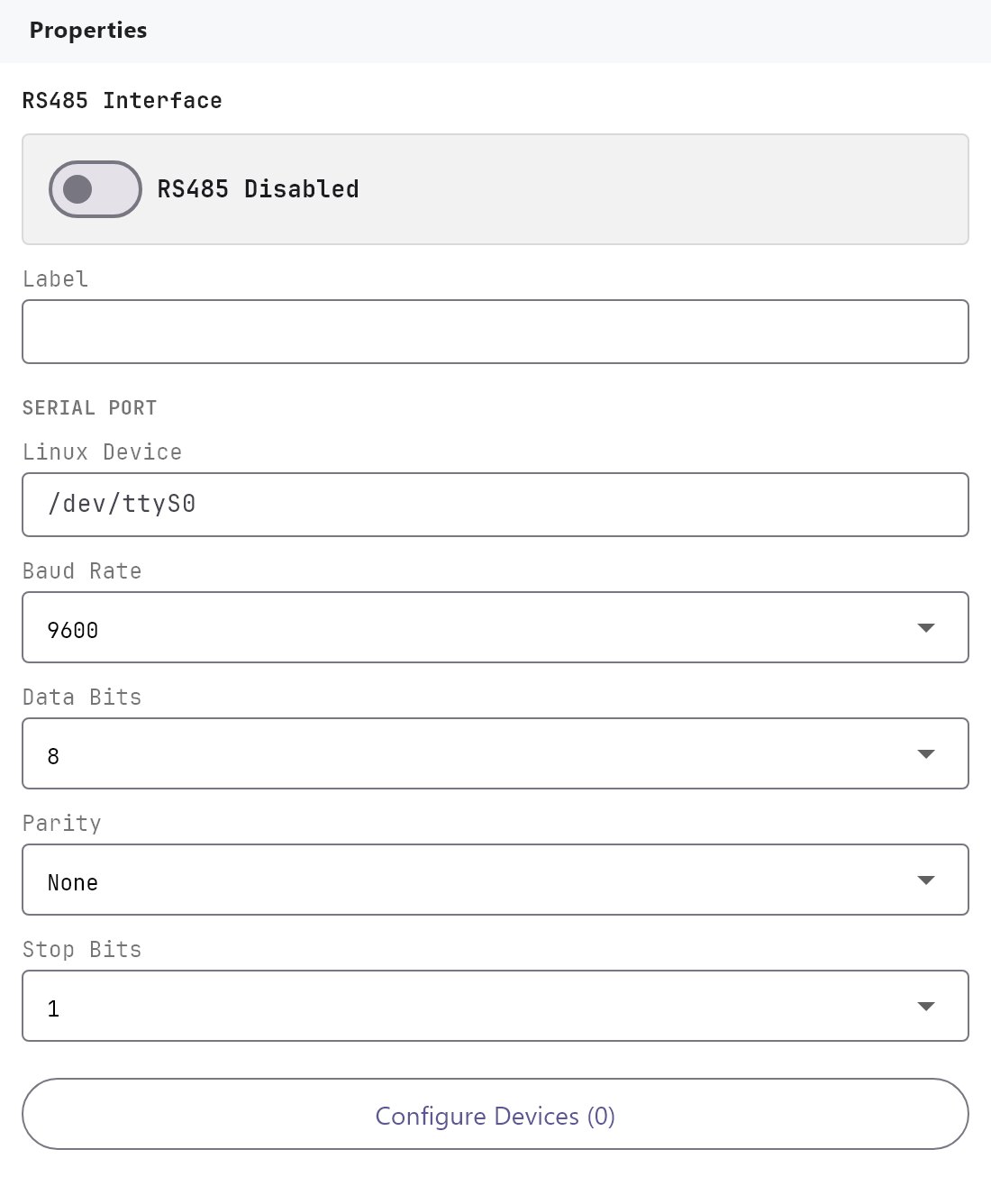
The RS485 interface is the gateway's serial bus for Modbus RTU devices such as energy meters, generator controllers, UPS units, inverters and air-conditioning gateways. You set the line parameters here and list the devices in the Configure RTU Devices dialog. Find it under Server > Interfaces > RS485 Interface.
#What it does
When the interface is enabled and has devices, the gateway opens the serial port and reads every polled datapoint of every enabled device in turn. Each reading becomes a reusable value that dashboard objects, the History Recorder, the MQTT Client and KNX can use. See Using system objects and reusable values.
The same screen is used by the RS232 interface. The only difference is the default port.
#Before you enable it
- Know the device's serial settings (baud rate, data bits, parity, stop bits) and its Modbus Slave ID. Every device on the bus needs its own Slave ID.
- Wire the bus A to A and B to B. If a device stays silent, try swapping A and B.
- Deploy to the gateway. Modbus runs only on the gateway, never on your PC.
#Settings
| Setting | What it does |
|---|---|
| Enabled | Switch, Off by default. When Off, the settings are kept but the gateway does not open the port. |
| Label | The name shown in the tree. Default RS485 Interface. |
| Linux device | The port's device path on the gateway. Default /dev/ttyS0. |
| Baud rate | 2400, 9600 (default), 19200, 38400, 57600, 115200 or 1500000. |
| Data bits | 7 or 8 (default 8). |
| Parity | None (default), Even or Odd. |
| Stop bits | 1 (default) or 2. |
| Modbus RTU devices | The button Configure RTU Devices (N) opens the device dialog. N is the number of devices. |
These settings must match the devices exactly. A mismatch in baud rate, parity or stop bits is the most common reason for a silent device.
#Configure RTU Devices
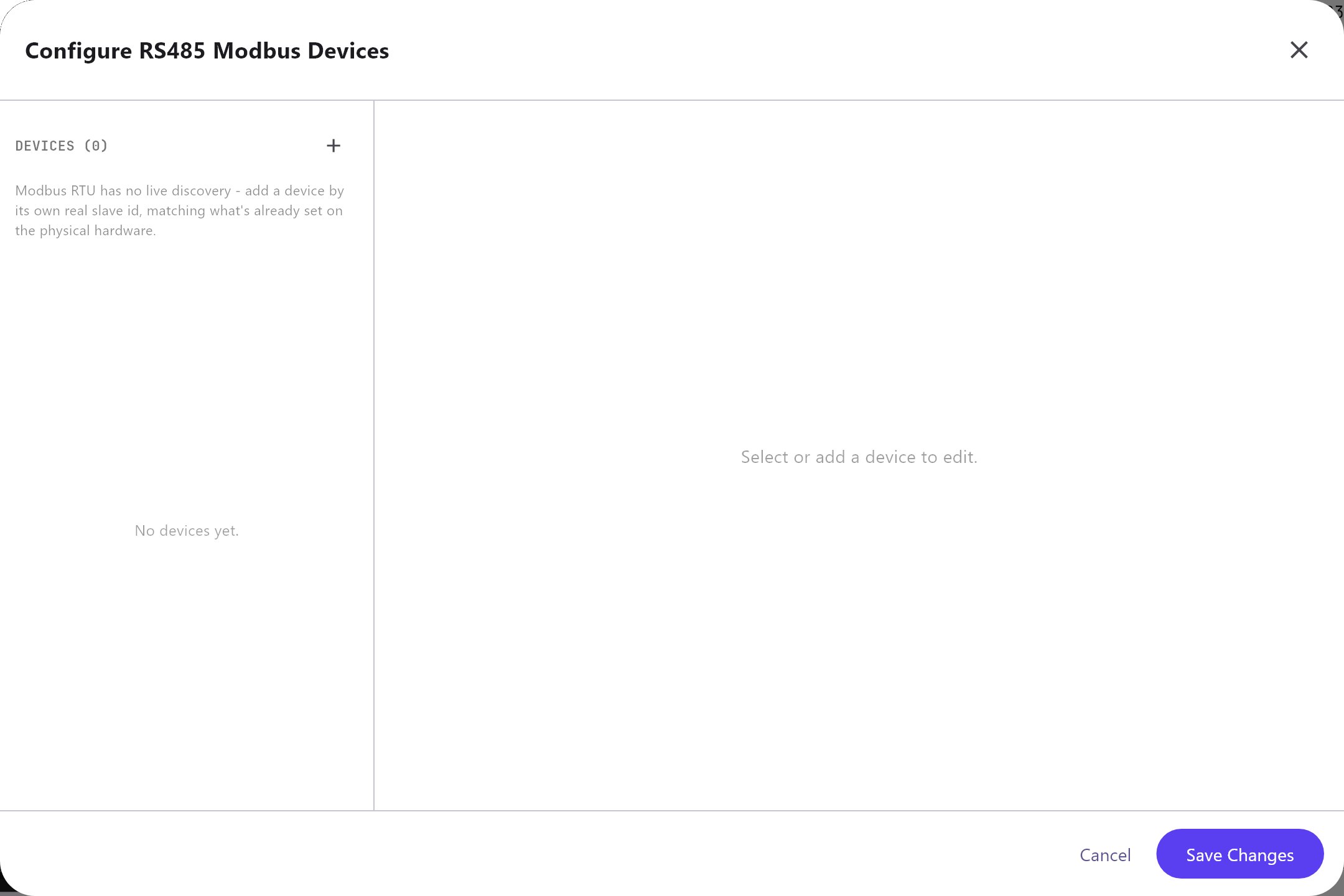
The dialog has a device list on the left with Add, Clone and Remove, and details on the right. Click Add first RTU device to start.
- Device tab: Protocol driver (a profile you load to fill in datapoints, or Generic Modbus RTU), Name, Slave ID (1 to 247), Enabled, Timeout (ms) (100 to 30000, default 1000) and Retries (0 to 10, default 2).
- Datapoints tab: the values to read, and optionally write, each with a Reusable value ID, address, read and write function, data type, scale, word order, a Poll switch, a live Latest value and Send value to KNX.
- Commands tab: named writes that send one or several register values at once.
Changes apply to the project as you make them. Cancel and Save Changes both just close the dialog.
Every field of the dialog is explained in Modbus devices and datapoints.
#Which services use the bus
| Service | How it uses RS485 |
|---|---|
| AC Manager, Genset Manager, UPS Manager, Solar Manager | Each has a Modbus RTU Device dropdown that lists the devices from this dialog. The gateway then reads that device with the manager's own built-in register map. |
| Water Tank Pump Control | Takes the tank level from a Modbus datapoint. |
| History Recorder, Analog Value, State Action | Use datapoints as system values. |
Configure the device first, then pick it in the manager.
#How it works on the gateway
- On a deploy, the gateway restarts the Modbus service only when the RS485 or RS232 settings, a manager's settings or an Enabled switch changed. If the interface is on but the port cannot be opened, the deploy still succeeds, and the gateway's deploy response notes RS485 enabled but not connected (check device path/wiring).
- The gateway sets the port with the baud rate, data bits, parity and stop bits above, in raw mode with no flow control. Any data-bits value other than 7 is treated as 8.
- All requests share the one line and are sent one at a time, so reads never overlap with writes from panels.
- The gateway reads every polled datapoint in turn, one device after another, and starts the next cycle 2 seconds after the previous one ends. There is no field in the Configurator for this interval.
- A device that does not answer within its Timeout is skipped for that cycle and the others keep their turn. A real error on the port makes the gateway close and reopen it.
- The Retries setting is saved in the project, but the gateway does not use it.
- A value that was not refreshed for 15 seconds is marked stale. A failed read marks its value stale straight away.
- With Send value to KNX on, the gateway writes the value to the group address. With Only on change on, it does so when the value changes by at least Min change. The first reading after a start is always sent.
- Diagnostics shows the bus state, the device path, the baud rate, the number of devices and the counts of successful and failed reads. A bus without any enabled device or polled datapoint is shown as not configured, even when the switch is On.
#Example
An energy meter with Slave ID 5 that is set to 9600 baud, 8 data bits, no parity and 1 stop bit:
- Open Server > Interfaces > RS485 Interface and switch Enabled on.
- Leave Linux device
/dev/ttyS0, Baud rate9600, Data bits8, ParityNone, Stop bits1. - Click Configure RTU Devices, add a device with Slave ID
5and add its datapoints. - Deploy, then open Diagnostics > Other Engines. The RS485 row should read READY with 1 device and growing OK counts.
A complete example that goes on to a dashboard object and KNX is in Using system objects and reusable values.
#Tips and common problems
- State is OFFLINE in Diagnostics: the port could not be opened. Check Linux device and that nothing else uses the port.
- State is PLANNED with the switch On: there is no enabled device with a polled datapoint, or the project has not been deployed.
- Errors count up and OK stays at 0: check wiring, Slave ID and the serial parameters. Use the Modbus Register Test on the Diagnostics page to read one register without defining a datapoint.
- Numbers are scrambled: try another Word order on the datapoint.
- A manager shows no device to choose: add the device in this dialog first.