
4.21History recorder
Reference for the History Recorder: which values it records, when it stores a sample, how long history is kept and how Graph objects read it.
The History Recorder stores the readings of KNX, Modbus and Zigbee values on the gateway over time. The Graph object draws them. This page lists every field of the recorder and its dialog.
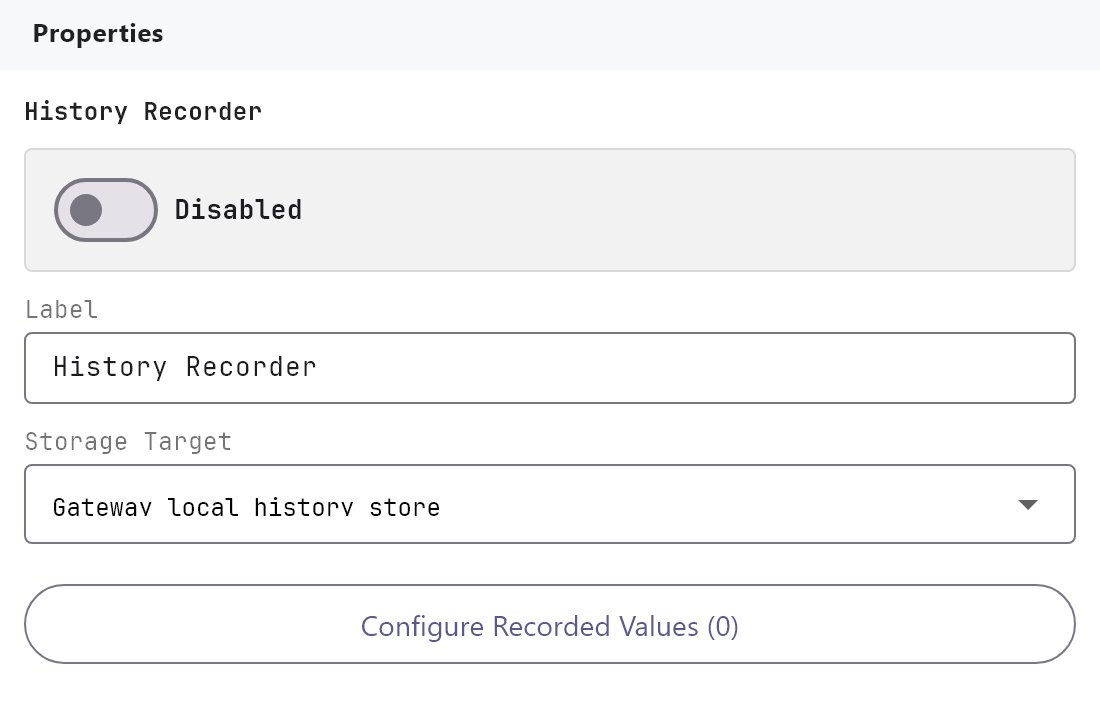
#What it does
You define recorded values. Each one is tied to a KNX group address or to a Modbus or Zigbee value, and has its own rules for when to store a sample and how long to keep old samples. The gateway writes the samples to its own storage and serves them to the apps when a Graph is opened. The recorder publishes no live System Object: a Graph series picks a recorded value by name.
#Before you enable it
- The service is Disabled by default. A recorder that is not enabled stores nothing. Turn Enabled on and deploy the project (see Deploying to a gateway).
- A KNX value is recorded only while the gateway sees telegrams for its group address. Check the address in the KNX engine first.
- For Modbus values, add the device and datapoints first (see Modbus devices and datapoints). Zigbee values come from the devices on the Zigbee gateway.
- History starts when you deploy. It cannot be filled in for earlier dates.
#Settings
| Setting | What it does |
|---|---|
| Enabled | Turns the recorder on or off. Off by default. |
| Label | The name in the Server tree. Default History Recorder. |
| Storage Target | Gateway local history store (default), Cloud archive or Local and cloud. Saved only: the gateway always stores history on itself, and nothing is archived to the cloud. |
| Configure Recorded Values (N) | Opens the History Recorder Values dialog. |
#History Recorder Values dialog
The list has Add, Clone, Remove, Up and Down. Import and Export in the header save and load the list as history-recorder-values.json. Importing replaces the whole list, and a file the Configurator cannot read is ignored without a message. Cancel and Save Changes only close the dialog.
| Field | What it does |
|---|---|
| Name | The name shown in the Graph's list. Default Recorded value. |
| Unit of measure | Text shown with the value, for example °C or kW. Empty by default. |
| Multiplying factor | Each reading is multiplied by this number before it is stored. Default 1. A factor of 0 is treated as 1. |
| Source | KNX (default), Modbus or Zigbee. |
| Type | The data type used to read a KNX value: DPT 1.001, 5.001, 7.001, 8.001, 9.001 (default), 12.001, 13.001 or 14.001. |
| KNX group | KNX source only. The group address to record. |
| System Object | Modbus or Zigbee source. The Modbus datapoint or Zigbee device value to record. |
| Store trigger | On every value update, After a fixed interval (default), When change exceeds threshold or Threshold or fixed interval. |
| Interval (seconds) | For the interval triggers. 5 to 86400, default 300. |
| Change Threshold (%) | For the threshold triggers. 0 to 100, default 5. |
| Value to store | Last received value (default), Rate of change, Accumulated value, Simple average or Time-weighted average. |
#Retention
Five rows control what happens to samples as they get older. Each row has an Action and an Interval in minutes (the interval is only used by the two average actions).
| Period | Default action | Default interval |
|---|---|---|
| After 1 day | Keep all values | - |
| After 1 week | Simple average per interval | 360 min |
| After 1 month | Simple average per interval | 1440 min |
| After 6 months | Weighted average per interval | 10080 min |
| After 1 year | Weighted average per interval | 43200 min |
The actions are Keep all values, Discard values (the day is deleted), Simple average per interval and Weighted average per interval (one sample per interval, averaged over time).
#How it works on the gateway
- Once a second the gateway looks at the latest value of every recorded value. It uses the latest value it has seen for the group address, or the latest published Modbus or Zigbee value.
- The first reading is always stored. After that the trigger decides.
On every value updatestores when the value differs from the last stored one. The threshold triggers compare against the last stored value in percent. If that value was 0, any next reading counts as a change, so a value sitting at 0 is stored every second until it moves. - Value to store decides what the sample contains.
Rate of changeis the change per second since the last sample.Accumulated valueis the reading multiplied by seconds, added up since the gateway started. The two averages use all readings since the last sample. - Samples go to one file per recorded value per day and are written to storage every few seconds. A day holds at most about 86,400 samples per value.
- Retention runs once a day. A day older than 1 day, 7 days, 30 days, 182 days or 365 days gets the action of the matching row, and a day passes through every row it has reached.
- The apps ask the gateway for a recorded value by range: Day, Week (7 days) or Month (31 days) ending on a chosen date.
#Example
Record the living room temperature for a Graph:
- Enable the recorder. Add a recorded value: Name
Living room temperature, Unit of measure°C, Multiplying factor1, SourceKNX, TypeDPT 9.001, KNX group2/1/5. - Set Store trigger
After a fixed interval, Interval (seconds)300, Value to storeLast received value. Leave the retention rows at their defaults. - Deploy. Add a Graph object and press Add Series, then choose
Living room temperature. See Graph.
#Tips and common problems
- The Graph says there is no recorded data: the recorder is not enabled, the project has not been deployed, or no telegram has reached the group address since the gateway started.
- A value is 10 times too big or small: set Multiplying factor. The Graph has no factor of its own.
- Choosing a very short interval: it multiplies the data stored. Use the longest interval that shows what the customer needs.
- Zigbee and Modbus lists are empty: configure the devices first. Other System Objects, such as Network I/O values, cannot be recorded here.