
3.4Dimmer Light
A light control with on/off and a brightness slider, bound to a KNX dimming actuator.
The Dimmer Light shows a light icon that changes with the brightness of a KNX dimmer. Tapping it opens a popup with a brightness slider, plus and minus buttons, and ON and OFF buttons.

#When to use it
- Any KNX dimming actuator channel where you want a brightness percentage, not just on and off.
- Lights that you also want to control by voice, with brightness (Apple Home, Alexa, Google Home or Home Assistant).
For a light with no dimming use a Switch. For coloured lamps use an RGB Lamp.
#Properties
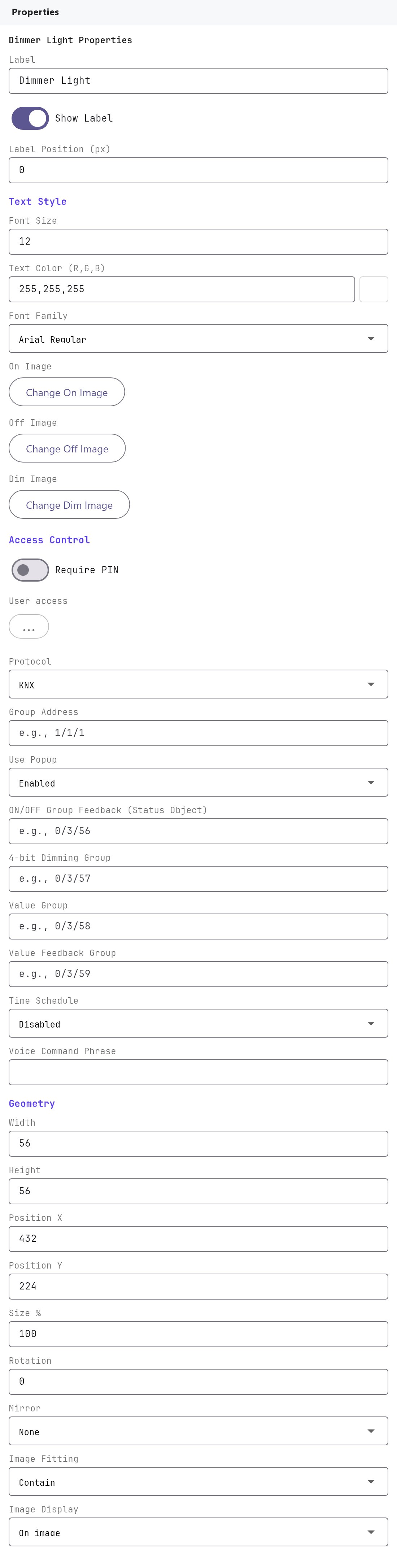
Label, Text style, Access control, Voice and Position and size work as described on Common properties. The Dimmer Light has three images: On Image, Off Image and Dim Image.
#Images
| Property | What it does |
|---|---|
| On Image | Shown at full brightness (100%). |
| Dim Image | Shown when the light is on at any level above 0% and below 100%. |
| Off Image | Shown when the light is off (0%). |
#KNX addresses
| Property | What it does |
|---|---|
| Protocol | KNX is the only protocol the apps use for a Dimmer Light. |
| Group Address | The on/off switching group address of the actuator (DPT 1.001), for example 1/2/20. |
| Use Popup | Enabled or Disabled. This field is shown, but the apps always open the popup when a Dimmer Light is tapped, whatever it is set to. |
| ON/OFF Group Feedback (Status Object) | The group address that reports the on/off state (DPT 1.001). |
| 4-bit Dimming Group | The relative dimming address (DPT 3.007). It is saved with the object, but the current apps do not send relative dimming; they use the Value Group instead. |
| Value Group | The brightness group address the apps write to, as a percentage from 0 to 100 (DPT 5.001). Required for the slider to work. |
| Value Feedback Group | The group address that reports the actual brightness (DPT 5.001). The icon and slider follow it. |
#How it behaves in the apps
Tap. Tapping the icon always opens the dimmer popup. If the Protocol is not KNX, the Veltnova client does nothing.
Popup controls. The popup shows the label, a slider from 0 to 100 with - and + buttons (5 percentage points per press), a Dimming box with the current percentage, and ON and OFF buttons.
- Slider. Dragging writes the brightness percentage (DPT 5.001) to the Value Group, at most about seven times a second so it stays smooth. Releasing the slider also writes ON (above 0) or OFF (0) to the Group Address, which suits actuators that do not switch on from a brightness value alone.
- + and -. Write the new brightness to the Value Group and the matching on/off value to the Group Address.
- ON. Writes ON (1) to the Group Address and the current brightness to the Value Group. If the current brightness is 0, it writes 100%.
- OFF. Writes OFF (0) to the Group Address.
- If the Value Group or Group Address is empty, the popup shows a "Set a value group address" or "Set a group address" message.
Icon and level. The brightness shown comes from the newest telegram on the Value Feedback Group or the Value Group. An on/off telegram on the Group Address or the ON/OFF Group Feedback address switches the icon between Off and On. The icon is the Off image at 0%, the Dim image above 0% and below 100%, and the On image at 100%.
Gateway. The gateway decodes the on/off addresses as DPT 1.001, the Dimming Group as 3.007 and the two value addresses as 5.001, whatever data type the object carries.
Voice. With a Voice Command Phrase the light is published to the voice integrations with an on/off and a brightness control. A brightness request writes to the Value Group.
#Example
A dimmable ceiling light in a living room.
| Field | Value |
|---|---|
| Label | Living room dimmer |
| Protocol | KNX |
| Group Address | 1/2/20 |
| ON/OFF Group Feedback (Status Object) | 1/2/21 |
| 4-bit Dimming Group | 1/2/22 (optional) |
| Value Group | 1/2/23 |
| Value Feedback Group | 1/2/24 |
| Voice Command Phrase | Living room light |
| Room | Living room |
Sliding to 60% writes 60 to 1/2/23. The actuator reports the real level on 1/2/24, and the icon switches to the Dim image.
#Tips and common problems
- The slider moves but the light does not. The Value Group is empty or wrong. Check it is the actuator's brightness object (percentage, 1 byte), not the 4-bit dimming object.
- The light stays off when you drag the slider. Some actuators only switch on from the on/off object. Releasing the slider writes ON to the Group Address (above 0), so check that this group address is the one the actuator's on/off object listens to.
- The slider jumps back after you let go. The Value Feedback Group is missing or reports a different value type. The feedback must be a percentage (1 byte, DPT 5.001).
- The icon never shows the Dim image. The icon needs brightness telegrams on the Value Feedback Group or Value Group. Check that the status object has its read and transmit flags set in ETS.
- Importing your ETS group addresses gives you autocomplete in every address field; see KNX basics for installers.