
3.20Solar Panel (Generic)
A read-only full-screen solar page where you map the production gauge and the energy totals to Solar Manager values or any Modbus datapoint.
The generic solar panel shows the current production of a solar plant and its energy totals. You choose the source of every figure yourself, so it works with the Solar Manager and with any inverter or energy meter you read through Modbus datapoints. It has no buttons: it is a display only.
#When to use it
Use it when the inverter is not a Fronius Tauro ECO, when production and grid export come from a separate energy meter, or when you want daily and yearly figures. If you have a Fronius Tauro ECO and want its live AC and DC readings, use the Solar Panel. Put the panel alone on its own page: in the apps it fills the whole screen.
#What you need first
Each field needs a source, either of:
- the Solar Manager (Server > Internal services > Solar Manager, with its Modbus RTU Device selected, for a Fronius Tauro ECO), or
- a Modbus datapoint added under Configure RTU Devices on the RS485 or RS232 interface, for example from a smart meter. See Modbus devices and datapoints.
The Solar Manager only provides the instant AC power and one lifetime energy counter. The daily, yearly and grid-export figures need a separate datapoint, for example from an energy meter.
#Properties
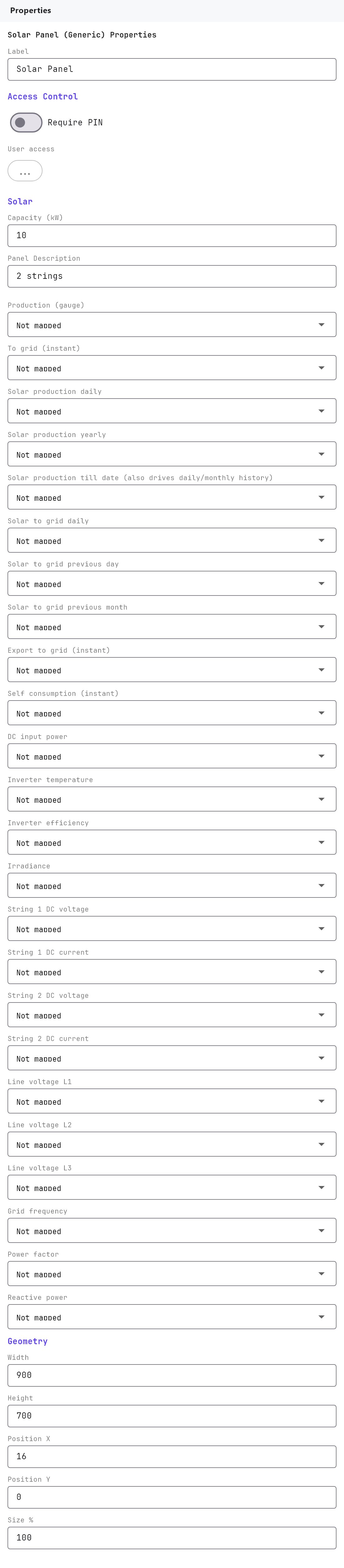
The Label, Access Control, Width, Height, Position X, Position Y and Size % fields work as described in Common properties. The Label is only a name in the Configurator (its default is Solar Panel). Default size is 900 by 700, used for the editor preview only. There is no Text Style or Protocol field.
| Property | What it does |
|---|---|
| Capacity (kW) | 0.5 to 5000, default 10. The full scale of the Production gauge. Set it to the plant's peak power. |
| Auto-map to Solar Manager | A button, shown only once the Solar Manager has a Modbus RTU Device. It maps Production (gauge) to the manager's AC power and Solar production till date to its lifetime energy, and leaves the other six fields alone. |
#Field mapping
Every row is a drop-down with the placeholder Not mapped, with a clear button. It has a Solar Manager group (when configured) and a Modbus RTU group (every datapoint, shown as device - datapoint).
| Property | What it shows in the apps |
|---|---|
| Production (gauge) | The production gauge and the Production box, in kW. |
| To grid (instant) | The To Grid box, in kW. |
| Solar production daily | Solar Production Daily, in kWh. |
| Solar production yearly | Solar Production Yearly, in kWh. |
| Solar production till date | Solar Production Till Date, in kWh. A lifetime counter that only goes up. |
| Solar to grid daily | Solar to GRID Daily, in kWh. |
| Solar to grid previous day | Solar to GRID Previous Day, in kWh. |
| Solar to grid previous month | Solar to GRID Previous Month, in kWh. |
#How it behaves in the apps
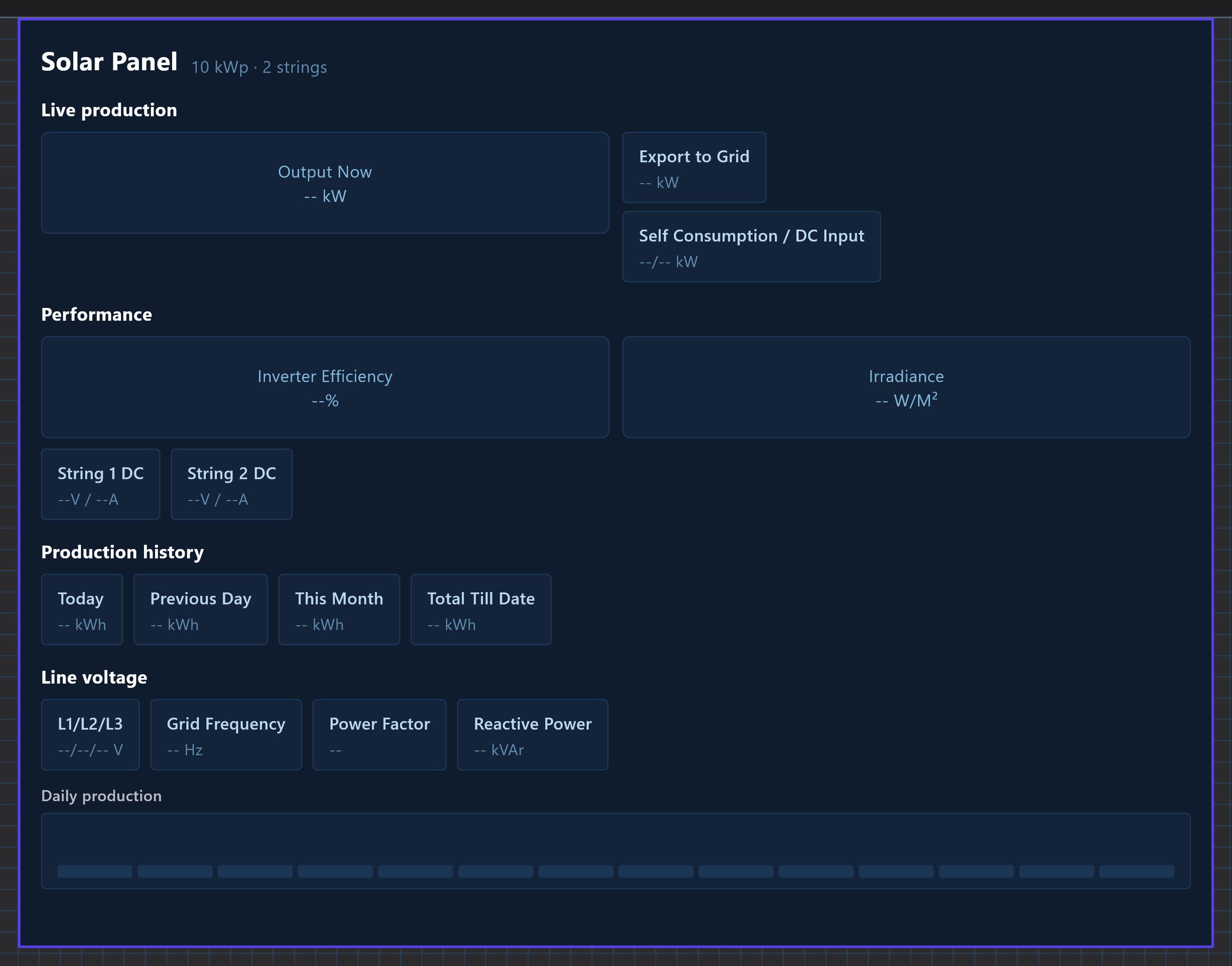
- Layout: a dark layout with Live production, Performance, Today, Previous day, This month, Total till date and a Daily production chart. Where a tile has no matching field in the Configurator it shows
--. - History: when Solar production till date is mapped, the gateway watches that counter. It stores the energy produced each day (the last 14 days) and the running month total, and the Veltnova client shows Today, Previous day, This month and Total from it. If that field is not mapped, Today and Previous day fall back to the fields Solar production daily and Solar to grid previous day.
- There are no controls and tapping does nothing.
#Example
A 12 kW plant with a Fronius Tauro ECO and a smart meter that reports grid export:
- Set up the inverter in the Solar Manager (see the Solar Panel page), and add the meter as an RTU device with datapoints
Export power(kW) andExport energy today(kWh). - Add a Solar Panel (Generic) with Capacity (kW)
12. Click Auto-map to Solar Manager. - Set To grid (instant) to the
Export powerdatapoint and Solar to grid daily toExport energy today.
#Tips and common problems
- Most fields show
--: the Solar Manager only supplies two values. Map the other fields to Modbus datapoints, or accept the blanks. - The gauge does not move: Production (gauge) is not mapped, or the source value is in watts instead of kW. Scale the datapoint, or use the manager's AC power, which is already in kW.
- No history in the Veltnova client: map Solar production till date to a lifetime kWh counter. History starts from the time you deploy and the gateway first sees the value.
- The Auto-map button is missing: the Solar Manager has no Modbus RTU Device selected yet.